
ThaiQROrder · Thai QR Order
Free QR code ordering and POS for restaurants in Thailand
Guests scan the QR on their table and order from their own phone, with no app to install. Orders ring in your app, kitchen tickets print, and guests pay by a PromptPay QR with the exact bill amount. Made for restaurants, cafés and street food stalls in Thailand.
🎉 Every feature is free for every shop until December 31, 2026
At a glance
- Price
- Every feature free until December 31, 2026 · from 2027, up to 60 orders a month costs nothing; above that a flat ฿99–999 a month by order volume (estimated)
- Commission
- 0% on every order. Guests pay the shop's own account; the money never passes through ThaiQROrder
- Guests
- Scan the QR and the menu opens in the browser: no app, no sign-up, 8 languages
- Shop devices
- The ThaiQROrder app on Android, iPhone and iPad (iOS 15+), on as many devices as you like, plus the owner portal on a computer at thaiqrorder.com/owner
- Printers
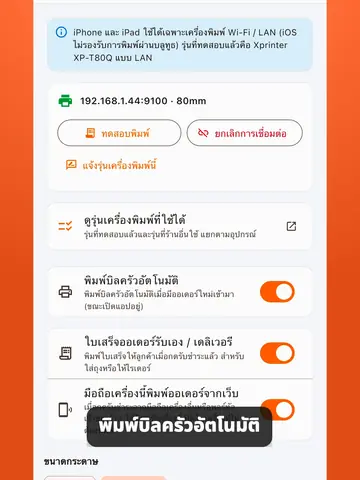
- Optional · ESC/POS thermal printers, 58 or 80 mm. Wi-Fi/LAN works with every device, Bluetooth with Android only · tested: Xprinter XP-T80Q
- Payment
- PromptPay QR with the exact bill amount; the guest taps "I have paid" and the shop checks its banking app. No card payments
- Beyond the table
- A free website at your-name.thaiqrorder.com (12 designs) with table reservations, pickup and delivery the shop runs itself
- Not available yet
- Card or e-wallet payments, cash drawer, discounts/service charge/VAT on the bill, split bills, stock, staff accounts with permissions, LINE OA, Grab/LINE MAN integration
Start in three steps
From an empty shop to your first order.
Download the app and sign up with your phone
Install ThaiQROrder from the App Store or Google Play, enter your phone number, type the SMS code and name your shop. No email or credit card.
Watch videoAdd your menu
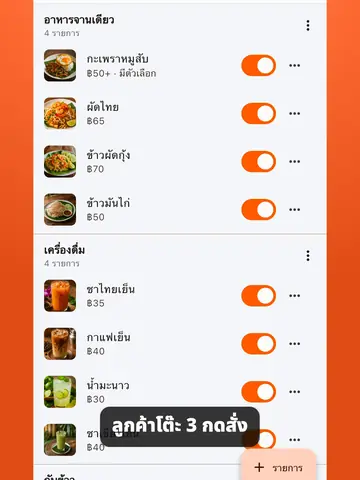
Create categories and add dishes with prices, photos optional. The menu is translated into 8 languages for you.
Watch videoPut the QR codes on your tables
Save every table's QR to your phone's photos, or download a PDF with 6 per A4 page from the portal. Print, place, and you are taking orders.
Watch videoWhat it changes in your restaurant
Three things QR ordering is actually worth. The full feature list is below.
Guests order the moment they sit down
No waiting to catch a member of staff, no waiting for a menu. They scan, read, and send the order straight to your kitchen, then order more rounds onto the same bill — so the same table serves more people in a day.
No commission on any order
Delivery apps take a cut of every dish. We never do: guests pay your own account directly. Right now every feature is free, and from 2027 a shop with up to 60 orders a month still pays nothing.
Every order rings, on every phone
A new order sounds an alert on every device signed in to your shop, and with a printer connected the kitchen ticket prints by itself while the app is open. Nothing waits on one person noticing a screen.
What you get
Everything below is included; there is no higher plan to buy. Tap ▶ for a short video of each (in Thai).
Run the whole shop from a phone or tablet
ThaiQROrder is both QR ordering and a restaurant POS. One phone is enough to start, several work together, and a receipt printer is optional.
- Staff order for guests at the table, and key in phone or counter orders for pickup or delivery — no QR scan needed
- Every order prints a kitchen ticket, the receipt prints at checkout, and lines can be taken off with a quantity, reason and staff name
- Move a bill to another table or merge two tables into one bill; the guests' QR follows the bill
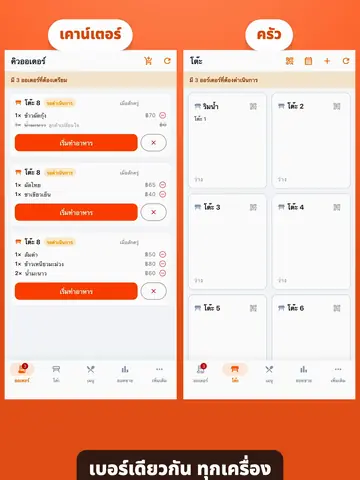
- Every device sees the same orders live, and each can be a station — the bar phone sees and prints only drinks
Ordering at the table
The part your guests see
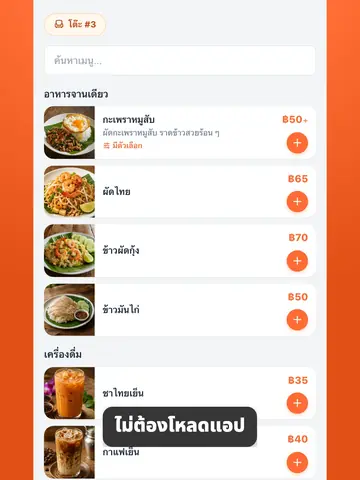
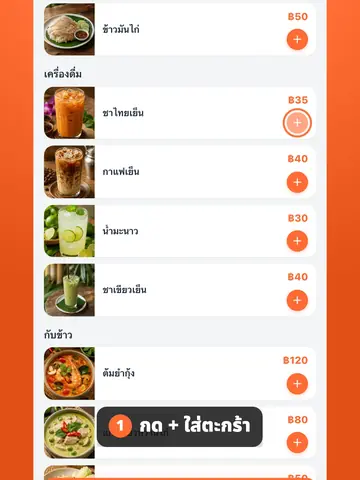
- Guests scan the QR and the menu opens in their browser — nothing to install, no sign-up, no phone number
- Your menu translated for you into 8 languages — Thai, English, Korean, Japanese, Chinese, Spanish, French, German — opening in the language of the guest's phone; you can correct any translation
- Dish options such as spice level or paid extras (up to 3 groups of 8 choices), plus a note per dish
- A fresh QR for each party (optional, needs a printer), so the previous guest's phone cannot order onto the new bill
Kitchen and payment
From the order landing to the bill closing
- A new-order alert on every device, with 3 sounds to choose from per device
- Kitchen tickets print automatically on a Wi-Fi/LAN or Bluetooth (Android) printer while the app is open on the device connected to it
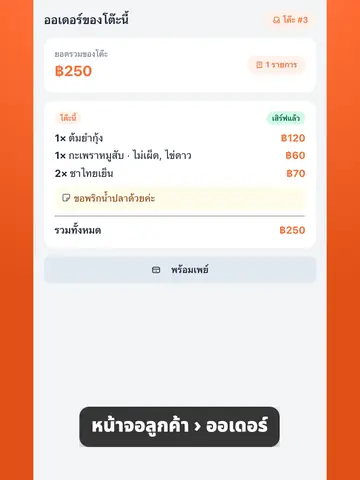
- A PromptPay QR with the exact bill amount: the guest pays, taps "I have paid" and the shop is notified at once; the money goes straight to your account
- One bill per table, settled and cleared with one tap, receipt included
Selling beyond the table
Included, not an upgrade
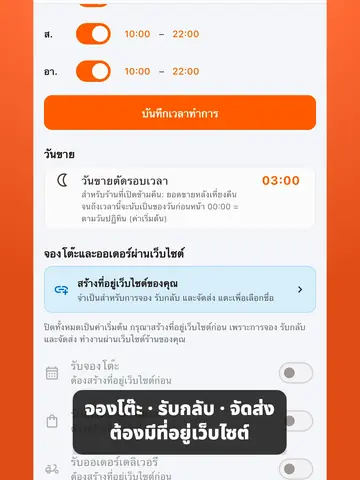
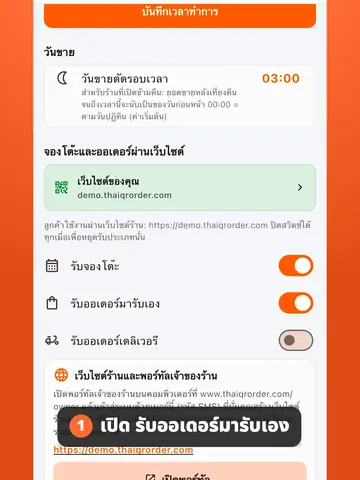
- A free website at your-name.thaiqrorder.com — 12 designs, menu with prices, opening hours and map; no hosting or domain to buy
- Online table reservations: confirm or decline in the app and the guest is emailed for you
- Pickup and delivery orders from your website: the guest pays first, the kitchen gets it once you confirm, and you deliver or book your own rider — no GP
- A published website gets its own sitemap and llms.txt, so Google and AI assistants read your menu, prices and hours correctly
Running the shop
The back-office work, handled
- Sales for today, the week and the month and your best sellers in the app; hourly and weekday charts in the portal
- Open past midnight? Set the sales-day cutoff as late as 05:59
- Export sales to Excel, up to a year per file, for your accountant
- Monthly costs and profit, staff records, clock-in/out and monthly payroll, in the portal on a computer
See it in use — each video under a minute
63 short video tutorials (in Thai) take a new shop from an empty menu to table orders, PromptPay payments, kitchen tickets and its own website.
If you don't sell, you don't pay.
Every feature is free until December 31, 2026. From 2027 there is a flat monthly fee by the number of orders, as in the table below (estimated pricing). A month with up to 60 orders costs nothing, and there is 0% commission on every order.
Estimated pricing from 2027
Per month. No setup fee, no contract.
| Orders per month | Fee |
|---|---|
| 0 – 60 orders | Free |
| 61 – 150 orders | ฿99 |
| 151 – 300 orders | ฿199 |
| 301 – 600 orders | ฿299 |
| 601 – 1,200 orders | ฿399 |
| 1,201 – 1,800 orders | ฿499 |
| 1,801 – 3,000 orders | ฿599 |
| 3,001 – 4,500 orders | ฿799 |
| 4,501+ orders | ฿999 |
Always 0% commission. The fee is paid by PromptPay.
How orders are counted: 1 order = 1 checkout, so each round at a table counts. Orders keyed in by staff and phone orders count; website pickup/delivery orders count once paid; cancelled orders are not counted.
Questions owners ask
What is ThaiQROrder?
ThaiQROrder (Thai QR Order) is QR code table ordering and a restaurant POS for restaurants, cafés and street food stalls in Thailand. Guests scan the QR on their table and order from their own phone without installing an app; the shop takes the orders, prints kitchen tickets and settles bills in the ThaiQROrder app on Android, iPhone or iPad. Every feature is free until December 31, 2026 and there is no commission.
Is it really free? Is there a monthly fee?
Every feature is free for every shop until December 31, 2026. From 2027, a shop with up to 60 orders a month pays nothing; busier shops pay a flat ฿99–999 a month depending on their order count (estimated pricing, see the table). No setup fee, no contract and no percentage of your sales.
How are orders counted?
Each checkout is one order, so a table that orders three rounds counts three. Orders keyed in by staff and phone orders count too. Website orders (pickup or delivery) count once paid, and cancelled orders do not count.
Do guests need an app or an account?
No. Guests scan the QR with their phone camera, the menu opens in the browser, and they order without signing up or giving a phone number.
Which languages is the menu in? Do I translate it myself?
Eight: Thai, English, Korean, Japanese, Chinese (Simplified), Spanish, French and German. The menu is translated automatically by AI and opens in the language of the guest's phone; you can correct any translation in the owner portal. The shop app itself is in Thai and English.
Does it work on iPad or iPhone? On several devices at once?
Yes. The app runs on Android, iPhone and iPad (iOS 15 or later). Every device signs in with the owner's phone number, sees the same orders and rings for each one, and each can be set as a station such as kitchen or bar. Separate staff accounts are not available yet.
Which receipt printers work? Can I use Bluetooth with an iPhone?
ESC/POS thermal printers with 58 or 80 mm paper. iPhone and iPad work with Wi-Fi/LAN printers only; Bluetooth printers work with Android only. The team has tested the Xprinter XP-T80Q (about ฿1,000). USB-only printers cannot connect. Models other shops have reported are listed at thaiqrorder.com/tools/compatible-printers.
Do kitchen tickets print automatically? Can the bar get its own?
Yes. Every new order prints a kitchen ticket while the app is open on the device connected to the printer. For a bar, set that phone's station to drinks: it then shows and prints only drinks on its own printer.
How does PromptPay work? Does it check the transfer?
Enter your PromptPay number once. Guests see a PromptPay QR with the exact bill amount, pay, and tap "I have paid"; the shop gets a notification and a mark on the table. Nothing verifies the money automatically — check your banking app before settling. The money goes straight to your account, never through ThaiQROrder, and there are no card or e-wallet payments.
Can I stop the previous table's guests ordering onto a new bill?
Yes. Shops with a receipt printer can turn on "A QR code per guest" in Store settings. When a party sits down, print that table's QR slip and hand it over; it orders only onto that party's bill and stops working when the bill is settled, while the fixed table sticker only shows the menu. Shops that leave it off keep ordering from the table sticker as before.
Can I move a table, merge bills or take items off an order?
Yes. Move a bill to another table or merge two into one, and the guests' QR follows the bill. To take items off, choose the quantity, a reason and the staff name; a slip prints for the kitchen and the portal reports every removed item.
We are open past midnight. Can the sales day end later?
Yes. Set the sales-day cutoff anywhere from 00:00 to 05:59; bills settled after midnight up to that time count for the previous day.
Is there a website, reservations and delivery?
Yes. Every shop can publish a free website at your-name.thaiqrorder.com (12 designs) from the owner portal and turn on table reservations, pickup and delivery. Website orders are paid by PromptPay first and reach the kitchen once the shop confirms; the shop delivers or books its own rider, the guest pays the rider for delivery, and there is no GP.
Can it replace a POS? What is missing?
It covers a restaurant's core work: table and counter orders, tables and bills, kitchen tickets, receipts, sales, costs and staff pay. Not available yet: card or e-wallet payments, a cash drawer, discounts, service charge, VAT and tax invoices on the bill, split bills, stock, staff accounts with permissions, and LINE OA or Grab/LINE MAN integration.
Is ThaiQROrder the same as Thai QR Payment?
No. Thai QR Payment is the Thai banks' standard for QR payments. ThaiQROrder is an ordering app and POS for restaurants that shows the shop's PromptPay QR so guests pay the shop's own account.
How do I start? Are there video tutorials?
Download the ThaiQROrder app, sign up with your phone number, add your menu and put the QR codes on your tables. There are 63 video tutorials (in Thai), each under a minute, at thaiqrorder.com/tutorials, and you can contact the team from inside the app; replies come within one business day.
Ready to start?
Every feature free until December 31, 2026. No contract, no credit card. Download the app and set up your shop.